The obligation is still an assumption
A turnover headline is copied into the rollout plan without checking the entity's exemption criteria, related-company position, commencement year or latest official guidance.

TREX Grow helps Malaysian SMEs organise company identity, customer and supplier data, product codes, document permissions and a representative pilot before daily e-Invoice work begins. It supports the operating work without pretending software can decide your obligation or tax treatment.
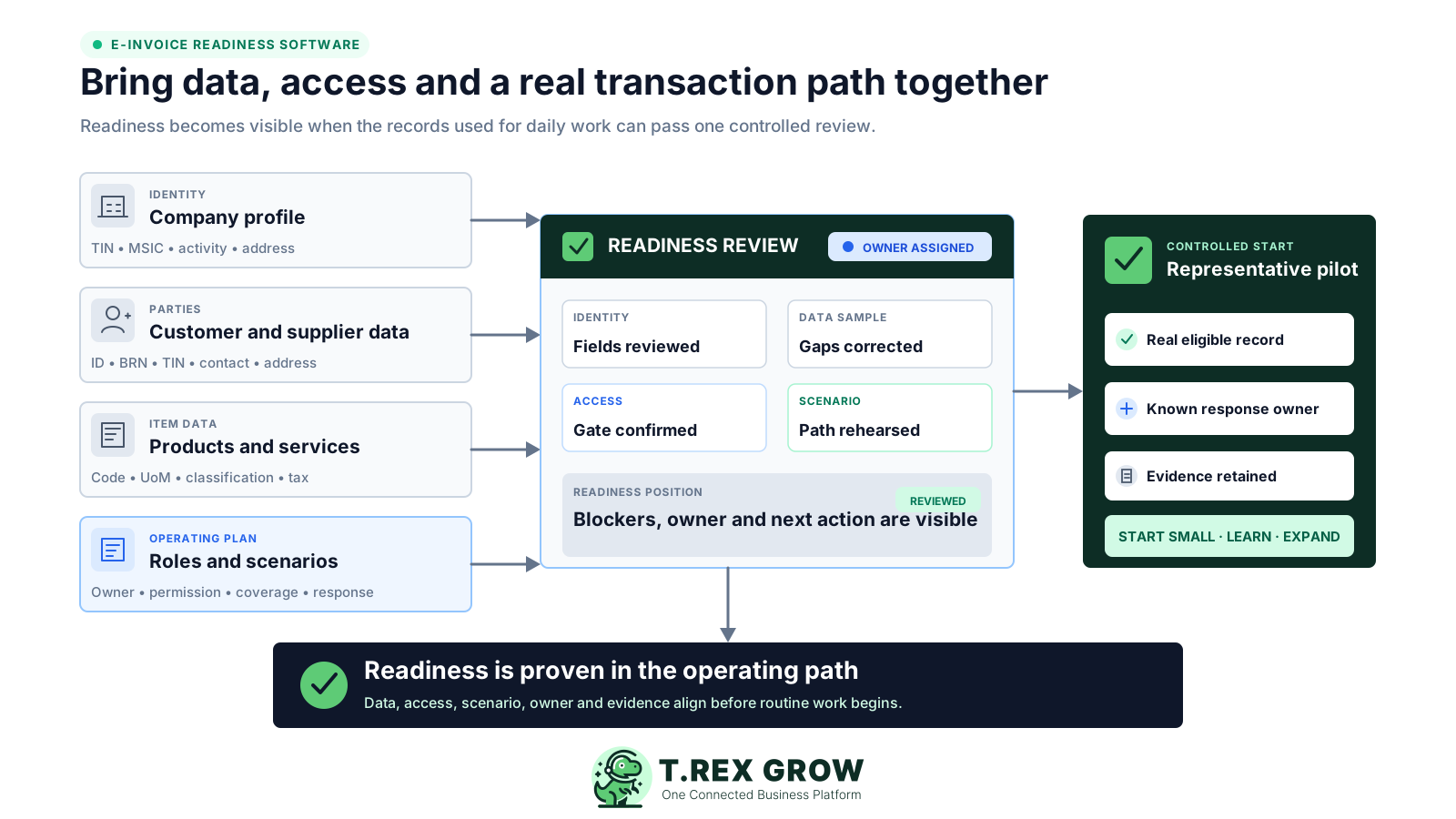
An e-Invoice can fail late because the operating problem started earlier: an incomplete company profile, an outdated buyer record, an unmapped transaction, a missing permission or nobody assigned to act on the result. Readiness software should make those conditions visible before they become production exceptions.
Operational pressure
When records live in different places, the person responsible has to reconstruct what happened before they can make a confident decision or follow up.
A turnover headline is copied into the rollout plan without checking the entity's exemption criteria, related-company position, commencement year or latest official guidance.
TIN, registration details, MSIC, business activity, contact or address data is missing when the document review begins.
Buyer or supplier ID type, BRN, TIN, telephone and address details are re-keyed for each transaction instead of maintained in the party profile.
Product code, description, unit of measurement, classification and tax information do not follow one controlled master-data approach.
Sales, purchasing, management and accounts do not know who owns source correction, review, submission or exception follow-up.
The team has not taken one normal transaction from source record through document state, review, authorised transmission and retained result.
Software can organise the records and controls used in an e-Invoice rollout, but it should not guess whether a taxpayer is required to implement, when an exemption ends or how a transaction should be treated. Record the obligation decision separately, then use the operating system to prove that the chosen path works.
Check the current HASiL timeline, general FAQ, entity structure and professional advice, then record the conclusion and a review date outside any software assumption.
The people, data, permissions, document states, access route and exception response must work together for the relevant transaction types.
Move forward only when a representative eligible record can be prepared, reviewed, submitted through the selected mechanism and followed to a retained result.
A checklist is useful for planning, but it does not become evidence merely because every row is green. If the underlying business records and permissions remain unchanged, the same gaps return when staff create the first real document.
Recurring issues usually point to workflow-control gaps, not one isolated data-entry mistake.
A spreadsheet says TIN and address are ready, but the actual customer profile used by the invoice is still incomplete.
A responsibility matrix names the reviewer and submitter, but the relevant application permissions and document states do not support the hand-off.
Adjustments, foreign buyers, applicable self-billed transactions and exception responses are ignored even when they occur in the business.
Authorised access enables the path; it does not repair source data, assign internal permissions or make every transaction eligible.
Readiness should use controlled internal rehearsal and a real eligible pilot, not invented live tax documents.
Guidelines, SDK code tables and validation rules change, but the rollout has no owner for reviewing the impact.
Look for software that improves the records used in daily work. The strongest readiness signal is not a generic percentage; it is a visible source record that can pass the right gates and leave retrievable evidence.
Maintain legal, tax, business-activity, contact and address details in the company profile used by document review.
Keep buyer and supplier ID, BRN, TIN, contact and address information with the party instead of retyping it for each document.
Use consistent product or service codes, descriptions, units, classification values and tax information across source transactions.
Make preparation, approval or finalisation and submission actions depend on the appropriate user permissions and record state.
Map the normal invoice, adjustment and applicable supplier-side paths the business genuinely expects to use.
Keep the returned document status and history with the source, and assign the next action when the result needs attention.
The best practice is to make the next action clear before the situation becomes urgent.
TREX Grow does not create a separate readiness score that can drift away from operations. It helps the team improve the company, party, item and document records that will be used in the actual workflow, then applies access and state gates before supported MyInvois submission.
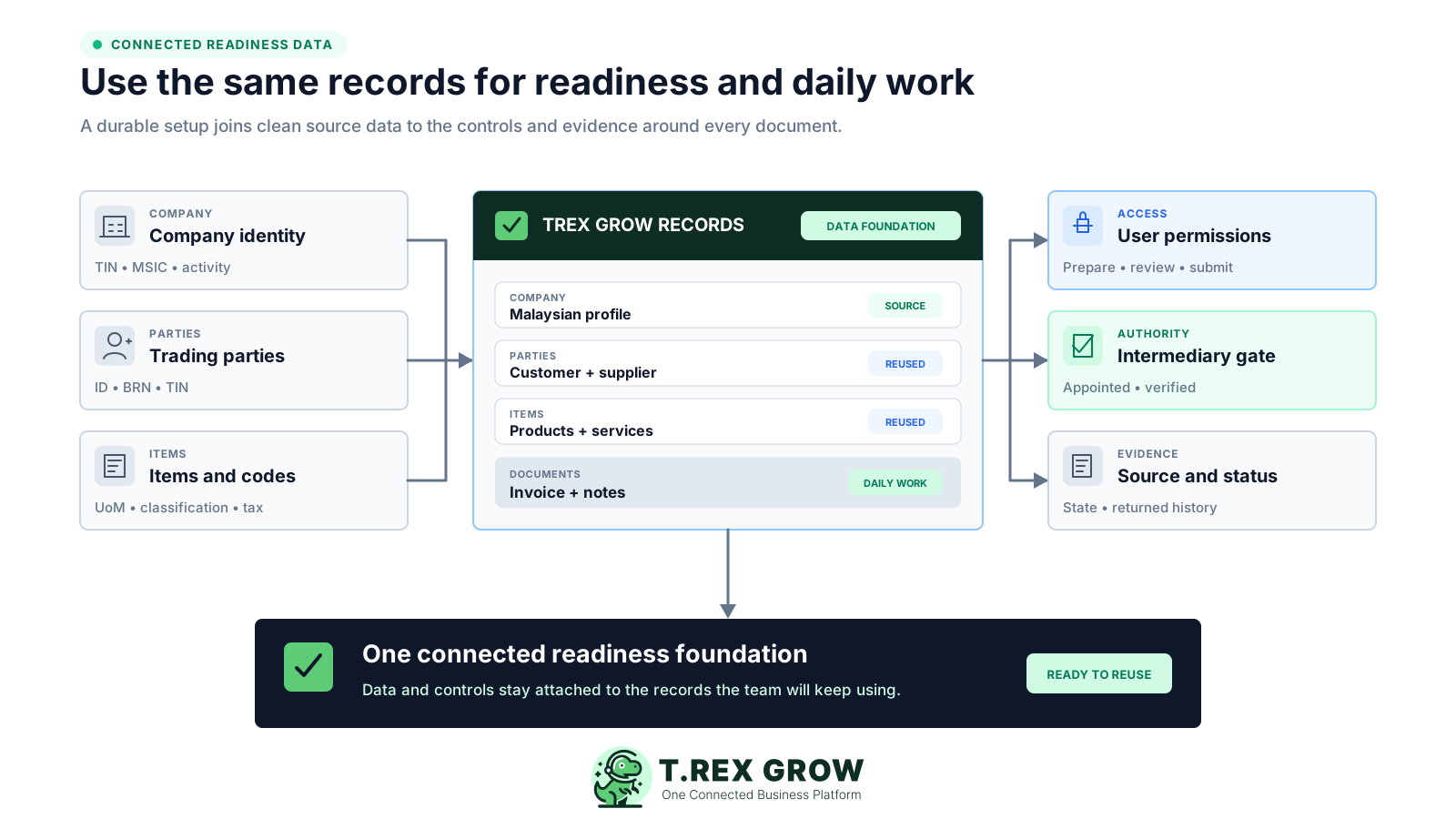
For Malaysian companies, legal information can include TIN, MSIC and business activity alongside the company contact and address used during review.
Maintain party ID, registration, TIN, contact and address information where authorised users can correct the source record.
Use controlled product codes, names, prices, units and Malaysia classification values; product import validates required Malaysia fields against predefined values.
Invoices can reuse customer and item context from supported source records, while finalised or approved state and user permission gate official actions.
The current TREX Grow path requires TREX HOUSE SDN. BHD. to be appointed in MyInvois and the status verified in Company Profile.
The document review surfaces party and line information before submission, while returned identifiers, status and previous attempts remain connected to the record.
Use one representative path to turn a readiness plan into operating evidence. Keep tax and obligation decisions with the responsible adviser or taxpayer owner, then use TREX Grow for the business records and controls it actually supports.
Record the current facts in one shared place.
Confirm what is known and what needs attention.
Make the next decision or follow-up accountable.
Complete the next task and record the outcome.
Refresh the shared view when facts change.
A dependable workflow keeps the shared record and the next action aligned.
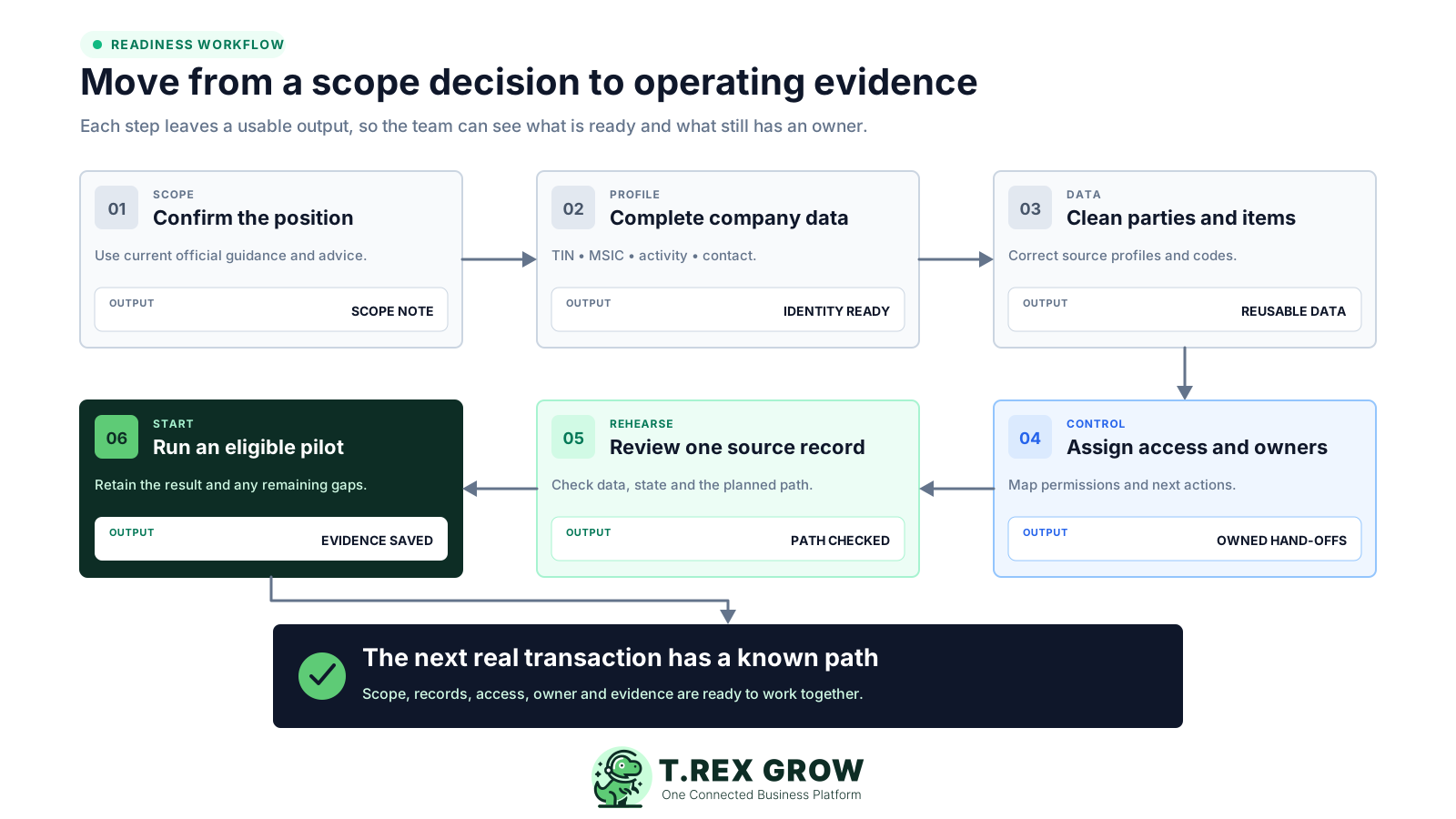
1. Confirm scope and review date: check the entity's current implementation or exemption position using official HASiL guidance and appropriate professional advice, then record the conclusion and next review date.
2. Complete the company profile: review TIN, registration details, MSIC, business activity, contact information and address, then complete the official intermediary appointment where the TREX Grow path will be used.
3. Clean party and item data: sample real customers, suppliers, products and services; correct the source profiles instead of patching the document at the last minute.
4. Assign permissions and owners: name who prepares, reviews, finalises, submits and responds to each relevant result, then confirm the software permissions support that hand-off.
5. Rehearse one representative record: create or use a normal source transaction, review its party and item information, confirm the document state and trace the planned submission steps without inventing a live tax transaction.
6. Start with a controlled eligible pilot: when the business is ready, use a real eligible document, retain the returned evidence and record every gap before expanding the rollout.
The readiness work becomes practical when a gap can be corrected in the record that caused it. TREX Grow applies different controls across company setup, master data, document creation, approval and the supported e-Invoice path.
Company Profile keeps TIN, MSIC, business activity and intermediary-verification state visible for the Malaysian workflow.
For supported Malaysian BRN parties and authorised access, TREX Grow can retrieve or validate a TIN and reflect the validation state in the party record.
The LHDN review identifies missing ID, TIN, contact and address information before moving to item and additional-information steps.
Product import requires classification for Malaysian companies and checks unit and classification values against the available code lists.
Supported quotation, sales order, delivery order or pro-forma context can flow into an invoice instead of being re-keyed without a source.
Draft, pending approval, finalised or approved states make the current record position visible before official submission.
Customer, supplier, product, invoice and submission work depends on the user's current module permissions rather than a shared login.
Returned status, IDs, timestamps and previous attempts remain retrievable from the relevant supported document.
A business is not ready merely because one perfect local invoice works. Select scenarios from the transactions the SME actually performs, then confirm the source data, owner, document type, review and next action for each one.
Use a normal buyer, ordinary product or service lines and the actual approval path as the baseline scenario.
Include a genuine non-standard buyer scenario when the business sells across borders or uses different identity handling.
Map what happens when an issued invoice must be reduced, increased or followed by money returned.
Review supplier identity, source references and responsibility only for transactions that genuinely meet current self-billing requirements.
Decide who corrects company, party, item or document data and who verifies the result after resubmission.
Document how the team will use the official MyInvois mechanism and maintain evidence if the preferred operating path is unavailable.
Readiness is a maintained state. Official requirements, code tables and SDK validation rules continue to change, so the rollout needs a named owner, a dated review and a way to assess which company, party, item or document fields are affected.
Recheck the current e-Invoice Guideline, Specific Guideline and general FAQ before changing the team's policy.
Review current production changes and announced future validations instead of assuming last quarter's field rules still apply.
Watch the current classification, unit, tax, state, country, currency and document-type lists used by relevant transactions.
For each update, record which master data, templates, integrations, user instructions and pilot scenarios need to be retested.
Keep the source, review date, decision owner and next check visible so readiness does not become an undated assumption.
The best practice is to make the next action clear before the situation becomes urgent.
A connected readiness approach does not remove every exception. It gives the team a clearer place to correct the source, a known owner for the next action and evidence that remains attached to the transaction.
Company and party gaps are corrected where the team maintains those records, so the next document can reuse the improvement.
The team can distinguish missing data, missing permission, incomplete document state and unavailable intermediary access.
Staff follow the same source-to-review sequence instead of inventing a new checklist for every submission.
Accounts, operations and management know who owns source correction, approval, submission and exception follow-up.
The returned submission position and prior attempts remain connected to the supported business document.
The records prepared for rollout become the records used after go-live rather than a temporary readiness workbook.
TREX Grow can support the operating records and workflow, but the taxpayer remains responsible for current obligations, transaction treatment and the accuracy of every submitted document.
The product does not determine the taxpayer's implementation date, related-company position or exemption eligibility.
Available code lists and validation do not replace the business's decision about the correct code, tax type or self-billing treatment.
TREX Grow does not claim one automated percentage can prove company, people, process and transaction readiness.
The software does not silently repair buyer identity, item classification, source-document or tax-treatment gaps.
Using software cannot guarantee correct treatment, uninterrupted service or a valid MyInvois result.
Customer invoices and Malaysia e-Invoice submission are available on the current Free plan; broader document and supplier workflows depend on plan, country and product scope.
Start with the company, customer, product and invoice records your team already manages. Close the visible gaps, assign the owner and prove one controlled eligible path before expanding the rollout.
e-Invoice readiness software helps a business organise the data, people, access and transaction paths needed before routine submission begins. In TREX Grow, that means improving company, customer, supplier, product and document records, applying permissions and states, reviewing supported e-Invoice information and retaining the returned result with the source record.